
Local LLM inference made easy
Inference snaps give you simplified access to local LLM inference with pre-trained models specifically optimized for your hardware. Install generative AI on Ubuntu devices, workstations, and servers with a single command.

From install to inference
Inference snaps automatically detect available hardware and install a compatible model and runtime configuration that best match its capabilities. Simply install the snap, then connect it to your application.
-
Install the model and matching engine
sudo snap install gemma4Model weights, runtime, and configuration are delivered together. Engine selection automatically takes hardware capabilities and available memory into account.
-
Check services and available endpoints
gemma4 statusUse the model’s local API from your preferred language or client to connect it to your application.
Why run AI locally with inference snaps
Solve the complexity of LLM setup while reducing network dependency. Keep responsive AI close to the application.
Lower latency
Keep inference near the user or device and process supported workloads directly on the host system. Avoiding remote API calls can save hundreds of milliseconds per request, making for a superior user experience.
Repeatable delivery
With inference snaps, you can deploy the LLM and runtime together in a simple, repeatable way. There’s no need to worry about choosing the right quantization, configuring the inference server, or managing updates.
Data privacy
With local inference, you can process sensitive data without it ever leaving your device. Additionally, inference snaps are subject to the same confinement rules as other snaps, so they are isolated from the rest of the machine.
Consistent workflow
Use the same packaging approach and workflow as projects move from a bench system to supported edge hardware. With Ubuntu and inference snaps, you get a consistent experience from prototype to deployment.
Inside an inference snap
Engines are the heart of inference snaps. They manage input, generation, and output of information. Inference snaps include engines optimized for a range of hardware, and during installation, the most suitable engine is automatically chosen for the host system. Inference snaps achieve this through engine manifests and the engine manager.
Learn more about inference snap architecture ›
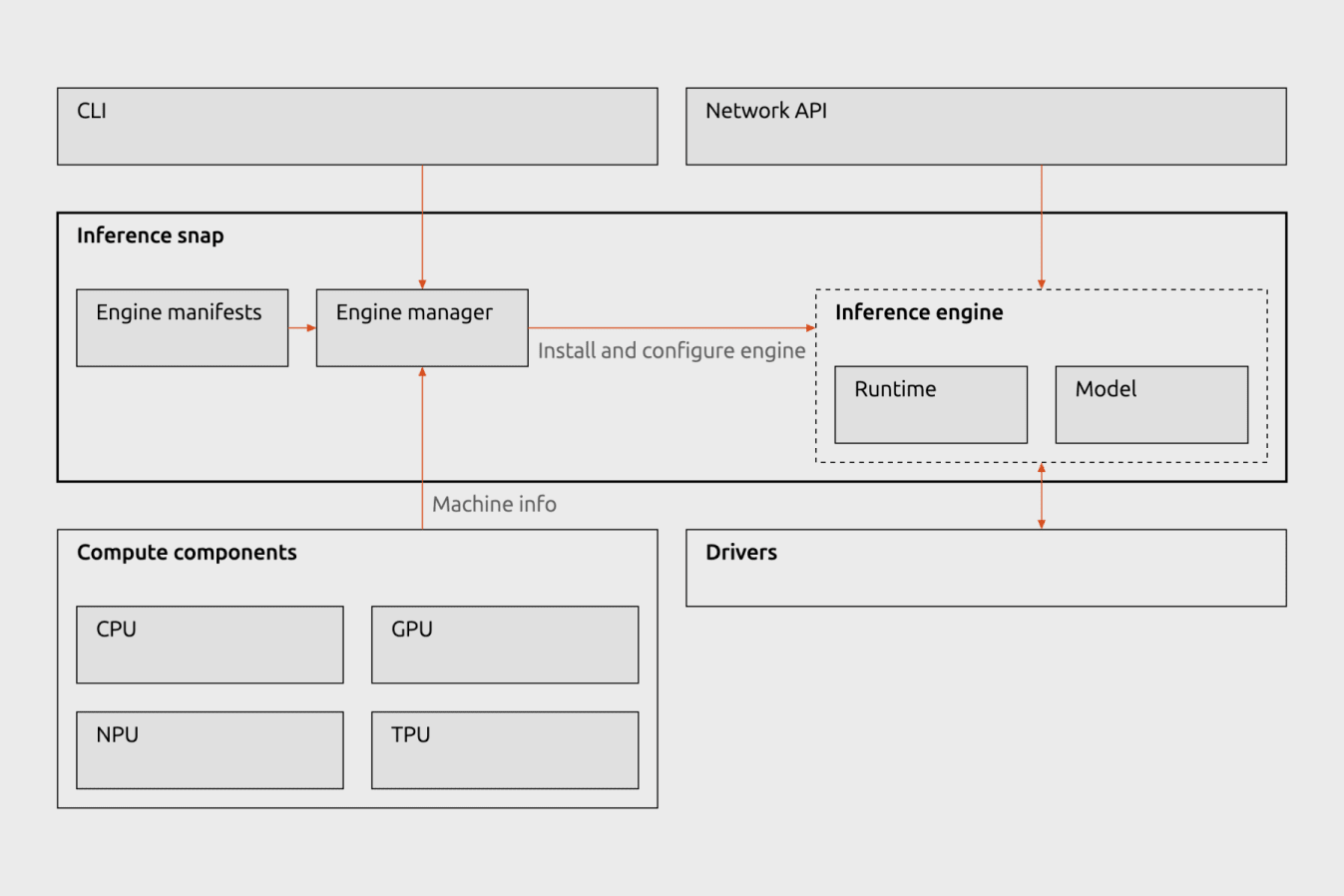
Engine manager
Evaluates available system memory and hardware accelerators to automatically select, install, and configure the most compatible inference engine.
Engine manifests
Each engine is accompanied by a manifest file describing its components, configurations, and system requirements.
Inference engine
The engine installed at runtime. A dedicated server execution environment that hosts model weights and exposes standard, production-ready networking APIs.
Compute components
Machine information feeds into the engine manager. This includes the accelerators and processors (CPUs, GPUs, NPUs, and TPUs) used for inference.
CLI
Standardized command-line tools for managing the inference snap.
Built for real inference workloads
Choose the right models for the job,
then run them close to the data source.
Visual inspection
Combine images and prompts for assisted local analysis on site.
Private assistants
Keep responsive chat and retrieval available on local systems.
Developer tools
Bring code assistance to workstations without a remote runtime.
Hybrid AI
Let decision models optimize token spend through local and remote models.